

Ref : https://github.com/f4goh/pico_vband
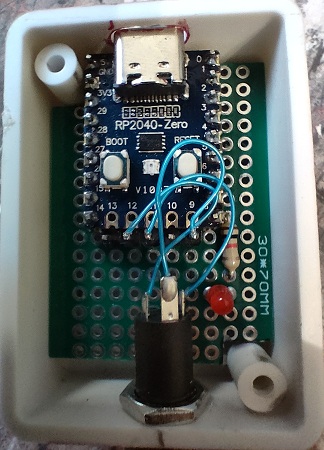
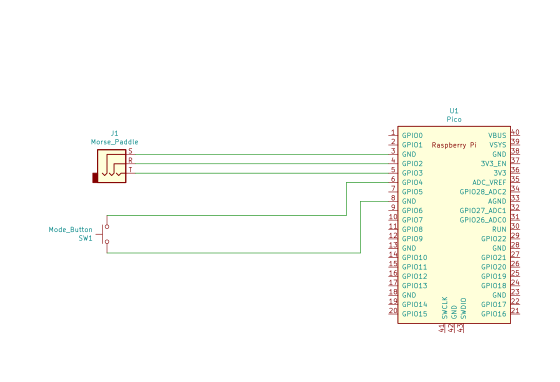
schema
Code
// SPDX-License-Identifier: MIT
//
// VBAND CW USB dongle based on a Pi Pico.
// Also supports other key outputs for Vail and morsecode.me etc.
//
// Inspired from similar projects at:
// https://github.com/sipsmi/vband_dongle/tree/main
// https://github.com/mgiugliano/MorsePaddle2USB
// https://github.com/nealey/vail-adapter
//
// There is also a PiPico circuit python implementation shown on
// https://www.qrz.com/db/KG5QNO


#include <Keyboard.h>
#include <KeyboardLayout.h>
#include <ClickButton.h>	// https://github.com/marcobrianza/ClickButton
#include <singleLEDLibrary.h>	// https://github.com/SethSenpai/singleLEDLibrary
#include <arduino-timer.h>	// https://github.com/contrem/arduino-timer

#define VERSION 1.1

#define DEBUG 0

// Pick your dit and dah pins - we go with the normal 'Dah on the right' convention
#define LEFT_PIN 3  //Dit
#define RIGHT_PIN 2 //Dah

// Mode/multi-function button pin
#define BUTTON_PIN 4

//#define LED_PIN LED_BUILTIN
// If you want a convinient external LED connection then I used GPIO9/pin12 along with the convinient
// GND on pin13. Enabling both LEDs at once is not completely trivial with the singleLEDLibrary, so
// right now you can have one or the other (onboard or outboard).
#define LED_PIN 8   // 9 physically convenient next to a gnd

// We are going to try and support:
// vband - https://hamradio.solutions/vband/
// vail - https://vail.woozle.org/#
// morsecode.me - https://morsecode.me/#/help/practice

// VBAND can use a number of different key combinations in the web browswer:
// - [ ]
// - CTRL-L CTRL-R

#define VBAND_LEFT '['
#define VBAND_RIGHT ']'

// Vail can use a number of different key combinations in the web browswer:
// - [ ]
// - CTRL-L CTRL-R
// - . /
// - x z
// We are deliberate choosing some different to VBAND
#define VAIL_LEFT 'x'
#define VAIL_RIGHT 'z'

// morsecode.me feels like it only supports a straight key, and has a number of keyboard
// chars it supports
// - .
// - i
// - e
// - [space]
// We are deliberate choosing something different to the others
#define MORSECODE_LEFT 'e'
#define MORSECODE_RIGHT 'i'

// And finally, support the CTRL key mode, as that can in some cases
// work I think when the target window does not even have focus, which
// might be useful
#define CTRL_LEFT KEY_LEFT_CTRL
#define CTRL_RIGHT KEY_RIGHT_CTRL

#define LEFT_INDEX 0  //Dit
#define RIGHT_INDEX 1 //Dah

char mode_array[][2] = {
  {VBAND_LEFT, VBAND_RIGHT},
  {VAIL_LEFT, VAIL_RIGHT},
  {MORSECODE_LEFT, MORSECODE_RIGHT},
  {CTRL_LEFT, CTRL_RIGHT}
};

int current_mode = 0; //Default to VBAND
const int max_mode = sizeof(mode_array)/sizeof(mode_array[1]);

#define MODE_BLINK_ON_TIME 100
#define MODE_BLINK_OFF_TIME 50
// Make sure this array is at least twice as long as the number of modes we have,
// as it encompasses both on/off times
int ledflash[] = {
  MODE_BLINK_ON_TIME, MODE_BLINK_OFF_TIME,
  MODE_BLINK_ON_TIME, MODE_BLINK_OFF_TIME,
  MODE_BLINK_ON_TIME, MODE_BLINK_OFF_TIME,
  MODE_BLINK_ON_TIME, MODE_BLINK_OFF_TIME,
  MODE_BLINK_ON_TIME, MODE_BLINK_OFF_TIME
};

//Our mode change button
ClickButton mode_button(BUTTON_PIN, LOW, CLICKBTN_PULLUP); //Active low button

//Our activity indicator led
sllib led(LED_PIN);

auto timer = timer_create_default();

//Track key states so we can flash LED in time.
bool left_down = false;
bool right_down = false;

//Try to debounce the keys a bit. Let's see if we only need to debounce from the down time - that is,
// ignore any 'ups' for this amount of time after the first down.
unsigned long key_debounce_ms = 10;
unsigned long left_down_ms = 0;
unsigned long right_down_ms = 0;

//Used with the timer blob to turn off some LED activity after a specified
//period - mainly because the LED library does not have oneshot calls sadly
bool cancel_leds(void *arg) {
  led.setOffSingle();
  return true;
}

// setup the pins and HID (device)
void setup() {
  if (DEBUG) { Serial.begin(115200); delay(3000); }
  pinMode(LEFT_PIN, INPUT_PULLUP);
  pinMode(RIGHT_PIN, INPUT_PULLUP);
  Keyboard.begin(); // initialise HID library

  mode_button.longClickTime = 350;  //Shorter time for a long click, not 1s default

  //We presume we start with the keys not down!, so don't bother reading them here.
  //left_down = digitalRead(LEFT_PIN);
  //right_down = digitalRead(RIGHT_PIN);

  //We start with a 'heartbeat' to show we are alive. Once a key is pressed this will stop and we move into
  //flashing the LED for each further activity.
  led.setBreathSingle(1000);  //We start with the breathing LED.
}

void loop(){
  int clicks;
  bool left_current = false;
  bool right_current = false;

  timer.tick();
  led.update();
  mode_button.Update();

  if (mode_button.changed ) {
    clicks = mode_button.clicks;

    if (DEBUG) Serial.println(" changed " + String(mode_button.changed) + ":" + String(mode_button.clicks));

    if (clicks != 0 ) {
      if (DEBUG) Serial.println("click " + String(clicks));
      if (clicks > 0 ) {
        //short click(s) - cycle through the modes
        current_mode = (current_mode + clicks) % max_mode;

        if (DEBUG) Serial.println(" mode " + String(current_mode));
        led.setPatternSingle(ledflash, (current_mode+1)*2);  //Flash LED with mode no.
        int flash_length = ((current_mode+1)* MODE_BLINK_ON_TIME) +
          ((current_mode+1)* MODE_BLINK_OFF_TIME);
        timer.in(flash_length, cancel_leds);
      } else {
        //Long press - reset to mode0
        current_mode = 0;

        if (DEBUG) Serial.println(" reset mode " + String(current_mode));
        led.setPatternSingle(ledflash, (current_mode+1)*2);  //Flash LED with mode no.
        int flash_length = ((current_mode+1)* MODE_BLINK_ON_TIME) +
          ((current_mode+1)* MODE_BLINK_OFF_TIME);
        timer.in(flash_length, cancel_leds);
      }
    }
  }

  //We should explain our debounce philosophy here a little.
  //Normally debounce routines wait for a set period of time (say, 10ms)
  //and look for 'stability' of the button value before registering the
  //button (key) has been pressed. What I want is to know as soon as the
  //button is pressed (or released), so acknowledge the press/release as
  //soon as we detect a change in state - but then to avoid the following
  //potential bouneces, we ignore all other changes for a set time (say, 10ms).
  //
  //One potential downside of this method is that it is likely not noise immune.
  //That is, if some noise turns up and briefly twiddles the pin, we will take that
  //as a press or release. But, that's the price we pay.
  left_current = digitalRead(LEFT_PIN) == LOW;  //active low!
  right_current = digitalRead(RIGHT_PIN) == LOW;  //active low!

  if (left_current != left_down ) { //did the key change state
    unsigned long ms = millis();

    if (DEBUG) Serial.println("LEFT change: " + String(left_current) + " to " + String(left_down));

    //Are we still in a debounce time slot...
    if (left_down_ms + key_debounce_ms > ms ) {
      //Still debouncing
      if (DEBUG) Serial.println(" deb " + String(ms - left_down_ms));
    } else {
      //Not debouncing, so lets process it
      if (DEBUG) Serial.println(" process " + String(ms - left_down_ms));
      if (left_current) { //button down
        left_down_ms = ms;
        //led.setBlinkSingle(5000); //A hack - as the old version of the library is missing 'On'
        digitalWrite(LED_PIN, HIGH);
        if (DEBUG) Serial.println("LEFT down");
        Keyboard.press(mode_array[current_mode][LEFT_INDEX]);
      } else {
        //Button up
        left_down_ms = ms;
        led.setOffSingle();
        if (DEBUG) Serial.println("LEFT up");
        Keyboard.release(mode_array[current_mode][LEFT_INDEX]);
      }
      //And remember which state we are in...
      left_down = left_current;
    }
  }

  if (right_current != right_down ) { //did the key change state
    unsigned long ms = millis();

    if (DEBUG) Serial.println("RIGHT change: " + String(right_current) + " to " + String(right_down));

    //Are we still in a debounce time slot...
    if (right_down_ms + key_debounce_ms > ms ) {
      //Still debouncing
      if (DEBUG) Serial.println(" deb " + String(ms - right_down_ms));
    } else {
      //Not debouncing, so lets process it
      if (DEBUG) Serial.println(" process " + String(ms - right_down_ms));
      if (right_current) { //button down
        right_down_ms = ms;
        //led.setBlinkSingle(5000); //A hack - as the old version of the library is missing 'On'
        digitalWrite(LED_PIN, HIGH);
        if (DEBUG) Serial.println("RIGHT down");
        Keyboard.press(mode_array[current_mode][RIGHT_INDEX]);
      } else {
        //Button up
        right_down_ms = ms;
        led.setOffSingle();
        if (DEBUG) Serial.println("RIGHT up");
        Keyboard.release(mode_array[current_mode][RIGHT_INDEX]);
      }
      //And remember which state we are in...
      right_down = right_current;
    }
  }
}